
Code Rhapsodie SyliusExtendedElasticsearchPlugin
Working Sylius Elasticsearch integration based on FOSElasticaBundle. The main goal of this plugin is to support filtering products by
options, attributes, taxons, channels and name in the front product list page. It totally replaces the default Sylius sylius_shop_product_index
route.
What is more, the plugin has a nice Sylius-oriented architecture that allows mapping resources to the Elastic document easier. It is flexible as well, so that you can customize the existing features for your specific business needs.
This project is based on BitBag SyliusElasticsearchPlugin
Installation
Note: This Plugin currently supports ElasticSearch 5.3.x up to 6.8.x. ElasticSearch ^7.x is not currently supported.
$ composer require code-rhapsodie/extended-elasticsearch-plugin
Add plugin dependencies to your config/bundles.php file:
return [
    ...

    FOS\ElasticaBundle\FOSElasticaBundle::class => ['all' => true],
    CodeRhapsodie\SyliusExtendedElasticsearchPlugin\CodeRhapsodieSyliusExtendedElasticsearchPlugin::class => ['all' => true],
];
Import required config in your config/packages/_sylius.yaml file:
# config/packages/_sylius.yaml

imports:
    ...

    - { resource: "@CodeRhapsodieSyliusExtendedElasticsearchPlugin/Resources/config/config.yml" }
Import routing on top of your config/routes.yaml file:
# config/routes.yaml

cr_sylius_extended_elasticsearch_plugin:
    resource: "@CodeRhapsodieSyliusExtendedElasticsearchPlugin/Resources/config/routing.yml"
Create a file named bit_bag_sylius_elasticsearch.yaml in config/packages
in which you will add this code to have the default configuration services :
code_rhapsodie_sylius_extended_elasticsearch:
    excluded_filter:
        options: ['option1']
        attributes: ['attribute1']
    filter_attributes_max: 30
    filter_options_max: 30
...and set up the redirection from the default Sylius shop products index page on top of your config/routes/sylius_shop.yaml
file.
# config/routes/sylius_shop.yaml

redirect_sylius_shop_product_index:
    path: /{_locale}/taxons/{slug}
    controller: Symfony\Bundle\FrameworkBundle\Controller\RedirectController::redirectAction
    defaults:
        route: cr_sylius_extended_elasticsearch_plugin_shop_list_products
        permanent: true
    requirements:
        _locale: ^[a-z]{2}(?:_[A-Z]{2})?$
        slug: .+
...and update installed assets with the following command:
$ bin/console assets:install
...and remove the default ElasticSearch index (app) defined by FOSElasticaBundle in config/packages/fos_elastica.yaml:
fos_elastica:
    clients:
        default: { host: localhost, port: 9200 }
    indexes:
        app: ~
should become:
fos_elastica:
    clients:
        default: { host: localhost, port: 9200 }
In the end, with an elasticsearch server running, execute following command:
$ bin/console fos:elastica:populate
Note: If you are running it on production, add the -e prod flag to this command. Elastic are created with environment suffix.
Usage
Rendering the shop products list
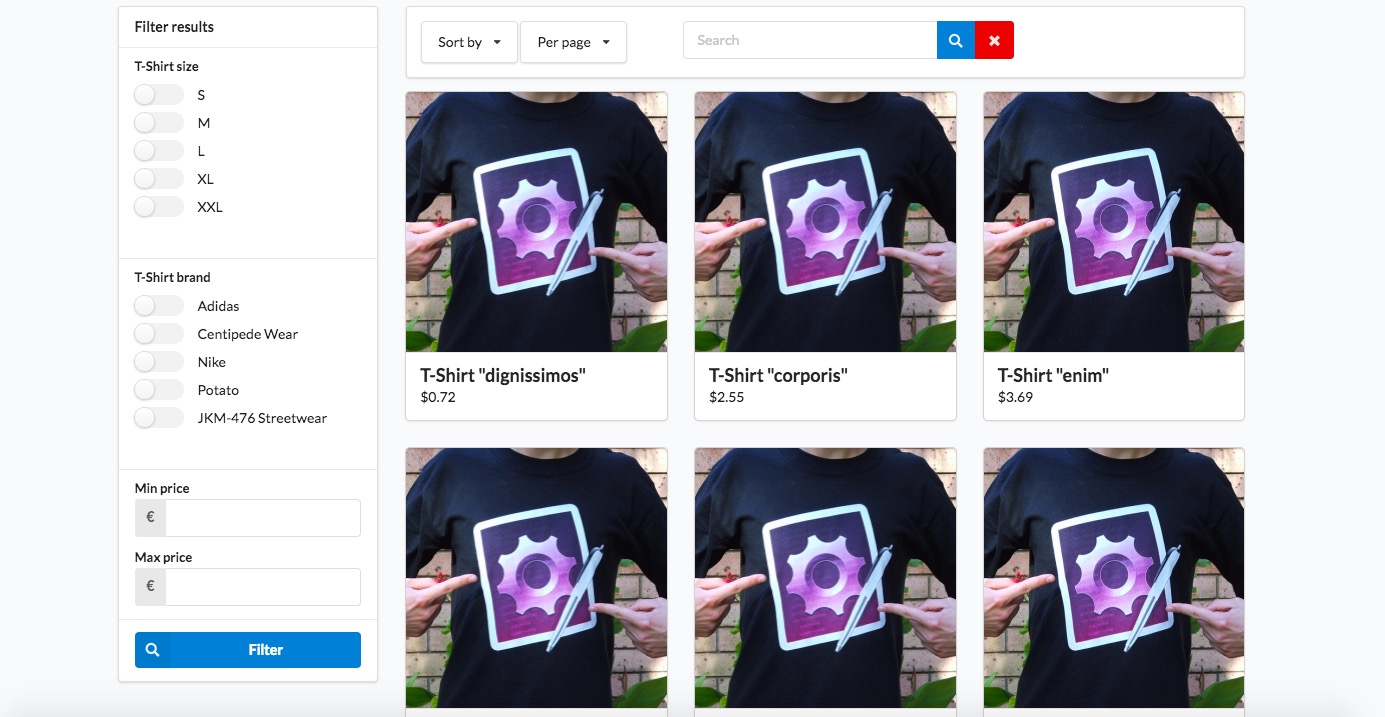
When you go now to the /{_locale}/products/taxon/{slug} page, you should see a totally new set of filters. You should see something like this:
You might also want to refer the horizontal menu to a new product list page. Follow below instructions to do so:
- If you haven't done it yet, create two files:
_horizontalMenu.html.twigintemplates/bundles/SyliusShopBundle/Taxondirectory_breadcrumb.html.twigintemplates/bundles/SyliusShopBundle/Product/Showdirectory
- Paste into those files content of respectively
vendor/sylius/sylius/src/Sylius/Bundle/ShopBundle/Resources/views/Taxon/_horizontalMenu.html.twigandvendor/sylius/sylius/src/Sylius/Bundle/ShopBundle/Resources/views/Product/Show/_breadcrumb.html.twigfiles, replacingsylius_shop_product_indexwithcr_sylius_extended_elasticsearch_plugin_shop_list_productsin both of them. - Clean your cache with
bin/console cache:clearcommand. - 🎉
If you're using vertical menu - follow steps above with _verticalMenu.html.twig file instead. It's in the same directory as the horizontal_menu.html.twig file.
Be aware! Elasticsearch does not handle dashes well. This plugin depends on the code field in Sylius resources. Please use underscores instead of dashes in your code fields.
Excluding options and attributes in the filter menu
You might not want to show some specific options or attributes in the menu. You can set specific parameters for that:
parameters:
    cr_ees_excluded_filter_options: []
    cr_ees_excluded_filter_attributes: ['book_isbn', 'book_pages']
By default all options and attributes are indexed. After you change these parameters, remember to run bin/console fo:el:po command again
(a shortcut for fos:elastica:populate).
Exclude attributes and options dynamically from the search filter
To allow dynamic exclusion of product attributes (or product options) in admin menu page, the App\Entity\Product\ProductAttribute class must implement the CodeRhapsodie\SyliusExtendedElasticsearchPlugin\Finder\FinderExcludableinterface
For example:
<?php
//...
use CodeRhapsodie\SyliusExtendedElasticsearchPlugin\Finder\FinderExcludable

class ProductAttribute implements FinderExcludable
{
    //...
}
If it's not the case (ProductAttribute doesn't implement FinderExcludable), the product attribute exclusion menu list will not be visible and will not appear.
It works the same way if you want to allow dynamic exclusion of product options
Reindexing
By default, current indexes listen on all Doctrine events. You can override this setting for each index by overriding index definition in your config.yml file:
fos_elastica:
    indexes:
        bitbag_attribute_taxons:
            types:
                default:
                    persistence:
                        listener:
                            insert: true
                            update: false
                            delete: true
Indexes with bitbag_shop_product, bitbag_attribute_taxons and bitbag_option_taxons keys are available so far.
Site-wide search
This plugin offers a site-wide search feature as well. You have a search box field where you query all products indexed on ElasticSearch. When you enter a query in the search box the results will appear in the search results page.
You can also add search facets (a.k.a. filters) to your search results page. To do so you have to add facets to the cr_sylius_extended_elasticsearch_plugin.facet.registry service (see an example of this service definition here). A facet is a service which implements the CodeRhapsodie\SyliusExtendedElasticsearchPlugin\Facet\FacetInterface. You can implement your own facets from scratch or you can decorate one of the basic facet implementation included in this plugin, which are:
TaxonFacetwhich allows to filter your search results by taxons using the ElasticSearchTermsaggregation.AttributeFacetwhich allows to filter your search results by product attributes values using the ElasticSearchTermsaggregation.OptionFacetwhich is the same asAttributeFacetbut for product options.PriceFacetwhich allows to filter search results by price range the ElasticSearchHistogramaggregation.
You can see an example of the definition of all of these facets here.
Customization
Available services you can decorate and forms you can extend
$ bin/console debug:container | grep cr_sylius_extendedelasticsearch_plugin
Parameters you can override in your parameters.yml(.dist) file
$ bin/console debug:container --parameters | grep cr_ees_
Testing
$ composer install
$ cd tests/Application
$ yarn install
$ yarn build
$ bin/console assets:install public -e test
$ bin/console doctrine:schema:create -e test
$ bin/console server:run 127.0.0.1:8080 -d public -e test
$ elasticsearch
$ open http://localhost:8080
$ vendor/bin/behat
$ vendor/bin/phpspec run
Contribution
Learn more about our contribution workflow on http://docs.sylius.org/en/latest/contributing/.